 See it in action
 Gift chooser (opens from the gift slot)
On this page
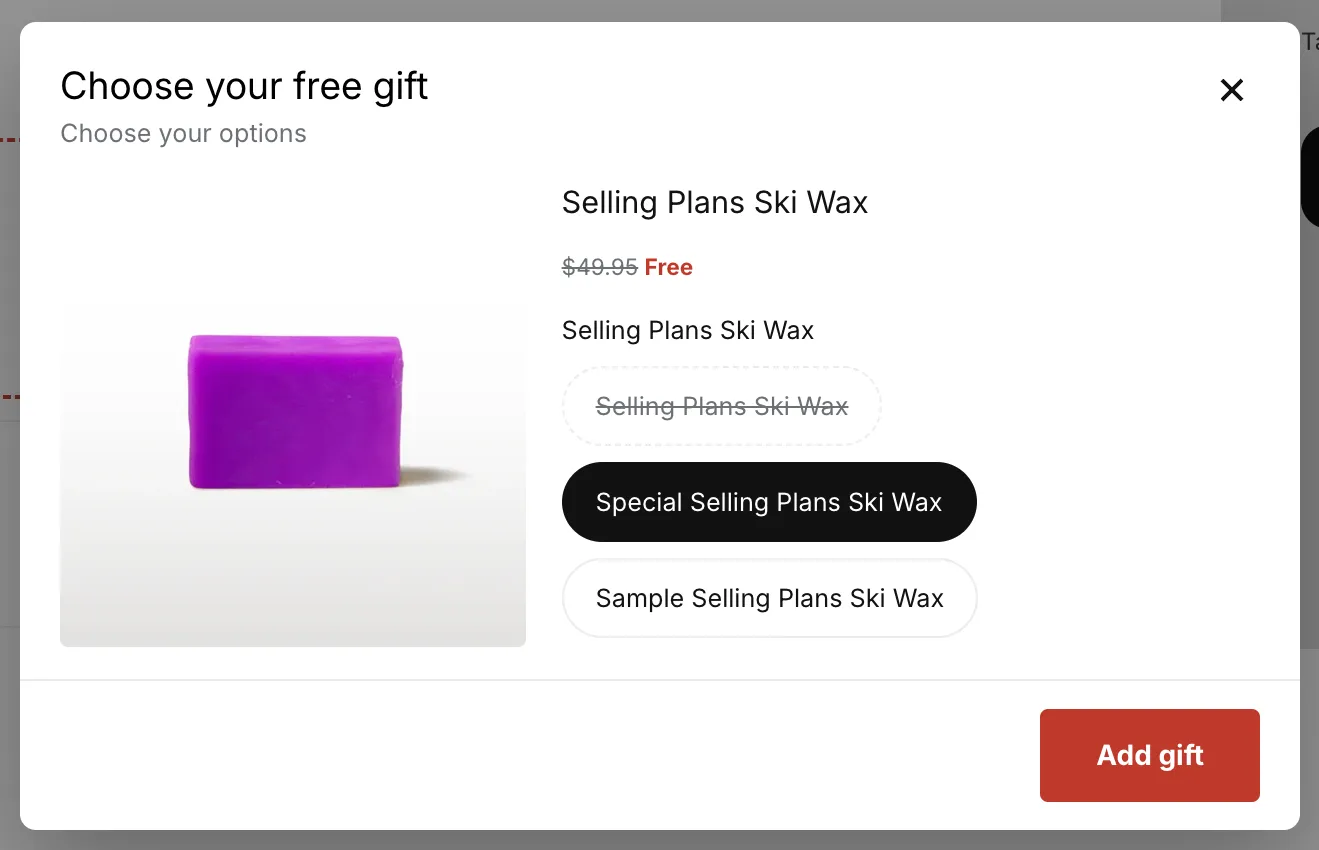
The gift chooser is the window that opens when a shopper presses Choose gift in the cart gift slot. It lets the shopper pick a gift product and its options, then adds the gift in one step. It has no theme block of its own: the gift slot opens it.
Made by: the gift offer of a Free gift promotion, or of a gift tier in a Tiered rewards promotion. It opens from that offer’s gift slot.
For developers: Styling · JavaScript API
What shoppers see
Step 1: Choose a product
A grid of product cards. Each card shows the image and the name. The price shows struck through with “Free”, but only when the gift is sure to be free. An action line says Add gift for a product with one variant, and Choose options for the rest.
Step 2: Choose your options
The product image on the left, which follows the chosen variant. Each option is a row of pills. A color option shows round swatches. A back arrow returns to step 1, and one Add gift button adds the gift.
AndOr skips steps it does not need:
- Step 1 is skipped when the gift lists one product.
- Step 2 is skipped when a product has one available variant. Its card adds it at once.
Two gifts in one deal
When a deal gives two gifts, the window shows a tray with two slots. Each pick fills the next empty slot, and the same product can fill both. The gifts are added in one go once every slot is full. Closing the window adds nothing.
On a phone
On screens narrower than 750px, the chooser is a bottom sheet: full width, with a grab bar and one card per row.
Sold out and not-free options
- An option that is sold out is struck through and can’t be picked.
- An option that would not be free with the items in the cart is struck through the same way. Screen readers hear “Not free with the items in your cart”.
- An option the discount does not include is not shown at all.
Keyboard and screen readers
The chooser is a real dialog. Focus moves into it when it opens and returns to the button that opened it. Escape closes the chooser and leaves the cart drawer open. Arrow keys move inside an option group, and Tab moves between groups.
Change the words
The chooser’s words (“Choose a product”, “Add gift”, “Close” and the rest) are part of the gift slot’s text. You can reword them per language on the Storefront text page.
Where it goes
Cart page and cart drawer, wherever the gift slot shows. The chooser has no block of its own.
What it needs to appear
- A gift slot is showing in the cart. See Free gift slot.
- The gift has more than one option to choose from: several products, or a product with several variants.
- Let shoppers choose their gift is on in the offer’s Gift settings.
Turn on Open the gift chooser when the gift unlocks in the gift settings to open the chooser by itself once, the first time the cart qualifies. Shoppers can close it and choose later.
Limits
- The chooser only opens from the gift slot. There is no block or tag that shows it on its own page.
- Colors use the swatches set on the product’s options in Shopify. When a value has none, AndOr tries the value’s name as a color (“Red”, “Navy”), else shows pills.